Redistribution by Geolocation
Extracts GPS EXIF coordinates embedded in photos and videos to automatically group your media into country, city, and location folders.
Organize, sort, and convert thousands of photos and videos on your Mac or Windows PC. Automatically group media by Geolocation, Date, or Orientation, convert Apple HEIC to JPEG, and compress file sizes — 100% locally and safely.
macOS Beta (TestFlight) · Windows 10/11 (MSI & Store) · 100% Offline
Features
Smart EXIF metadata extraction, automated directory structuring, format conversion, and real-time execution.
Extracts GPS EXIF coordinates embedded in photos and videos to automatically group your media into country, city, and location folders.
Parses original camera capture timestamps to sort disorganized media dumps into clean chronological Year and Month (YYYY/MM) hierarchies.
Automatically detects image and video dimensions to separate vertical smartphone reels, stories, and portrait shots from horizontal landscape media.
Batch converts Apple's HEIC photos into universal, high-quality JPEG images while preserving complete EXIF metadata, orientation, and color profiles.
Smart local compression reduces massive raw photos and 4K/HD video clips down to lightweight sizes without visible loss of sharpness.
Choose 'Copy Files' mode to keep your original directory completely untouched, or 'Move Files' mode for instant in-place reorganization.
Engineered with a high-performance native pipeline that processes thousands of high-resolution photos and video files in seconds.
Runs entirely on your local computer. No cloud uploads, no account creation, and zero analytics tracking. Your private media stays private.
App Interface
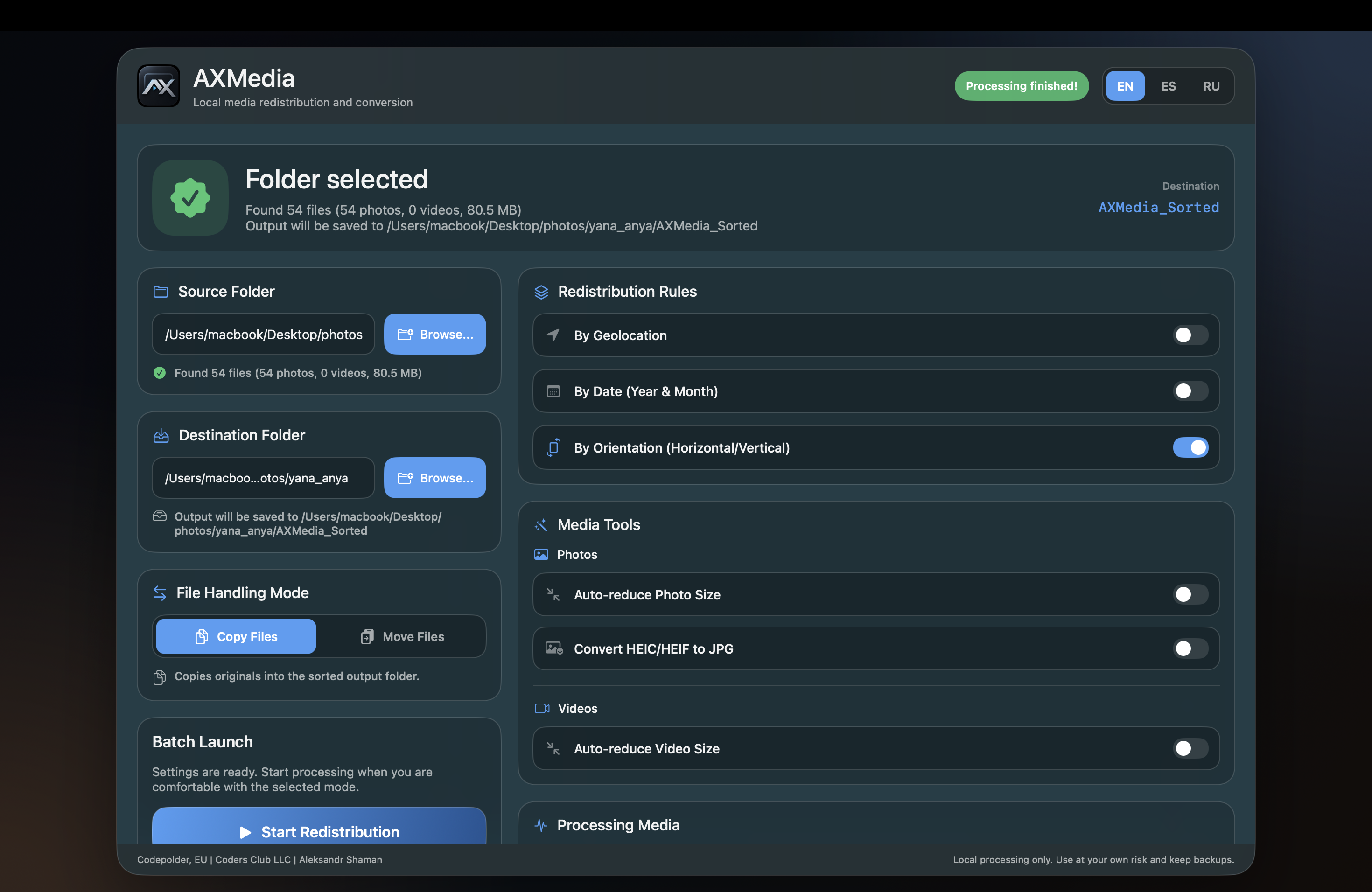
Intuitive, high-performance desktop interface for macOS and Windows. Configure redistribution rules, convert media formats, and watch real-time batch progress.
 AXMedia — Redistribution & Tools
Media Redistribution Rules & Optimization Tools: Choose source and destination folders with real-time file detection. Toggle smart redistribution rules: by Geolocation (GPS EXIF), by Date (Year & Month), and by Orientation (Horizontal vs Vertical). Enable media tools: auto-reduce photo and video size, and convert Apple HEIC/HEIF photos to high-compatibility JPEG with one click.
AXMedia — Batch Execution & Log
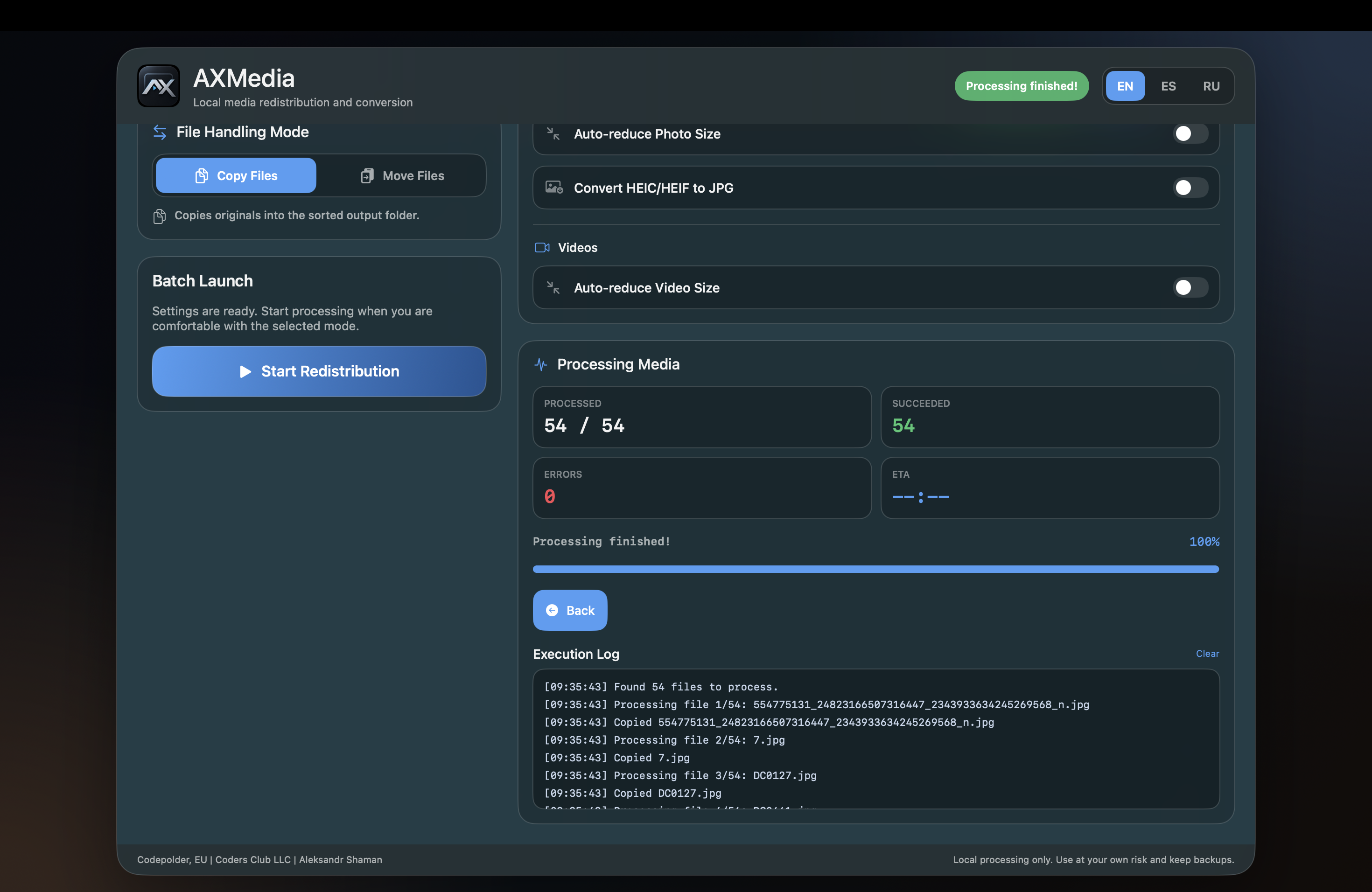
Real-Time Batch Execution & Detailed Audit Log: Monitor sorting and conversion in real time: track processed files, successful count, error counter, and progress bar with completion time. Inspect the live timestamped execution log to verify each file copied or moved safely.
Seamless compatibility with all major smartphone, camera, and video formats.
One-Click Conversion to JPG
Transfers all camera EXIF metadata, timestamps, and GPS coordinates into universal JPEG.
Date & Geolocation Structuring
Sorts DSLR, mirrorless, and smartphone photos into organized folders by place and capture date.
Orientation Split & Video Compression
Isolates vertical video clips from horizontal widescreen footage and applies smart size reduction.
Safe File Handling
Original media is never deleted or altered when running in safe Copy Files mode.
AXMedia runs 100% locally on your machine. Your personal memories are never transmitted to external cloud servers.
How it works
Organize your media library in four simple, transparent steps.
Choose the unorganized Source Folder with your photos or videos, and pick an output Destination Folder.
Toggle sorting rules: by Geolocation (GPS), by Date (Year & Month), or by Orientation (Horizontal vs Vertical).
Optionally turn on auto-reduction for photo/video size and instant HEIC/HEIF to JPG conversion.
Select Copy Files or Move Files mode and click Start Redistribution to watch real-time execution and logs.
AXMedia executes all parsing, moving, and conversion directly on your computer with zero telemetry and zero cloud uploads.
Unlike cloud sorters that upload your files to remote servers, AXMedia operates strictly on your local machine. Your personal memories remain private.
Accurately reads GPS tags, camera EXIF headers, creation timestamps, and pixel aspect ratios to organize files without manual effort.
Instantly turn iOS HEIC photos into standard JPEGs that open seamlessly on Windows PCs, TVs, and web services.
Built without bloated web runtimes. Starts instantly, uses minimal RAM, and batch processes thousands of files with high efficiency.
Clear answers about media sorting, HEIC conversion, and system compatibility.
AXMedia inspects the metadata inside your media files (EXIF tags, GPS coordinates, timestamps, and pixel dimensions). Based on your selected rules, it creates structured destination folders by location (country/city), by date (Year/Month), or separates vertical videos and portrait photos from horizontal media.
In 'Copy Files' mode, your original files are 100% untouched. AXMedia reads the original files and creates organized, converted copies in your chosen destination folder. If you choose 'Move Files' mode, files are reorganized into the new folders directly.
The macOS version of AXMedia is distributed via Apple TestFlight. Simply click the 'Join Beta on Apple TestFlight' button, open the link on your Mac, and install AXMedia through the official Apple TestFlight app.
Windows users can download the standalone .EXE installer package directly from our website (/dist/axmedia.exe), or install it through the Microsoft Store. Both editions run locally with full functionality.
Yes. When you enable the 'Convert HEIC/HEIF to JPG' toggle, AXMedia automatically converts Apple mobile photos to high-quality JPEG format while preserving all original EXIF dates, camera settings, and GPS tags.
Download AXMedia and organize gigabytes of media in seconds. Free, native, and completely private.
Download AXMedia